Vim
Distributions
Vim distributions are Vim + custom settings + custom plugins from certain authors and are therefore very opinionated.
A modern configuration of the powerful and famous Vim, Cream is for Microsoft Windows, GNU/Linux, and FreeBSD.
This is a distribution of plug-ins and mappings for Vim, Gvim and MacVim.
It is designed to provide minimal working environment using the most popular plug-ins and the most common mappings.
The distribution is completely customisable using a ~/.vimrc.before and ~/.vimrc.after Vim RC files.
spf13-vim is a distribution of vim plugins and resources for Vim, Gvim and MacVim.
It is a good starting point for anyone intending to use VIM for development running equally well on Windows, Linux, *nix and Mac.
The distribution is completely customisable using a ~/.vimrc.local, ~/.vimrc.bundles.local, and ~/.vimrc.before.local Vim RC files.
教程
Featured Plugins
插件管理器
该插件用来管理Vim的插件,可以让插件的安装与卸载更加方便。配合Github和Submodule效果更佳。
- vim-plug
文件,代码搜索工具
搜索目录下的文件,没有依赖于其他语言,轻量级的。
自动补全
关键字补全、文件路径补全、tag补全等等,各种,非常好用,速度超快。neocomplete 也不错,但是它是基于lua的。
需要Vim支持Lua
前Google的C++工程师Valloric (Val Markovic) 开发的一款,专门用于C系(C,C++,C#) 的自动补全工具, 优点是速度非常快,而且支持变量跳转,函数关联跳转,检测代码报错, 可以说是最牛逼的补全工具,缺点是太难配置,对于除了C系语言的其他语言补全支持并不好. 对于刚接触Vim的同学来说相当不友好, 不过文档比较齐全.
代码检测
代码对齐,格式化
格式化对齐文本。可以将常用的格式,排版方式做成键位映射,更加方便,速度感人.
代码排版,格式化插件, 它参考了tabular, 并且集成了tabular的优点,同时集成了自己的一套规则方法,有一定的学习成本,适合想装逼,想挑战的同学,本文作者没用过,所以就不吹牛逼了
- lion
文本对齐 gl : gL :
极速跳转
提供在文件中快速跳转和定位位置。
<Leader><Leader>: 启动
<Leader><Leader>w : 查找单词的开头
<Leader><Leader>f : 查找单词的字符
<Leader><Leader>b : 向后搜索,跳转到单词的开头
<Leader><Leader>e : 向前搜索,跳转到单词的结尾
<Leader><Leader>j : 向下跳转到行首
<Leader><Leader>k : 向上跳转到行首
<Leader><Leader>n : 向前跳转到最近通过/或者?搜索后的匹配项
<Leader><Leader>N : 向后跳转到最近通过/或者?搜索后的匹配项
让 w, e, b 等跳转时能处理类似 CamelCase 这样的单词,当成2个单词。
快速的就近选择一个候选文本对象,并能通过快捷键继续简单的扩大文本对象范围。
快速选择文本。
我们知道, vim中F和f 键位只能快速定位当前行,对。仅仅只是当前这一行,但是sneak 可以使其完全支持多行 f 和 F 进行跳转!
作者haya14busa (haya14busa)是个日本萌妹, incsearch 是增强vim 中自带的 ? 和 / 搜索功能, 并且支持更加高级的正则表达式匹配, vim默认搜索是只能高亮一个当前匹配的字符,但是incsearch却可以同时高亮所有匹配的字符!!!
版本控制
展开项目的Git Tree ,需要 vim-git 和vim-fugitive 的支持
方便在Vim里面使用Git的插件。
文本处理
快速添加,删除,修改 [ ] {} “” “ ,XML tag, HTML tags等。
- cs”’ : “Hello world!” -> ‘Hello world!’
- cs’
: ‘Hello world!’ ->
Hello world!
- ds” : “Hello world!” -> Hello world!
- ysiw] : Hello world! -> [Hello] world!
- cs]{ : [Hello] world! -> { Hello } world!
- yssb or yss) : { Hello } world! -> ({ Hello } world!)
ds{ds) : ({ Hello } world!) -> Hello world!
[multiple-cursors]()
多光标操作,多重选取,多光标输入。在 Normal 模式下按 Ctrl-n 高亮选中当前光标下的单词,并且将光标放在单词尾部;继续按,会选中下一个重复的单词。 如果在Visual模式下选中一行, 按 Ctrl-n 选中每一相同行,并将光标放在末尾,并回到 Normal 模式。
显示撤销树浏览器。
编程相关
让cpp文件在.h和.cpp文件中切换。
- [vim-commentary]()
快速注释插件,绝对改善生活, 但是在HTML文件中还是有小bug的
该插件会生成工程目录树,显示树形结构。
该插件生成函数、变量列表。
注释代码的插件。
- ,ca : 在可选的注释方式之间切换,比如C/C++ 的块注释/* */和行注释//
- ,cc : 注释当前行
- ,c
: 切换注释/非注释状态 - ,cm : 注释多行
- ,ci : 翻转注释
- ,cs : 以”性感”的方式注释
- ,c$ : 从光标开始注释
- ,cA : 在当前行尾添加注释符,并进入Insert模式
- ,cu : 取消注释
Normal模式下,几乎所有命令前面都可以指定行数。Visual模式下执行命令,会对选中的特定区块进行注释/反注释
[count]
cc |NERDComComment| Comment out the current line or text selected in visual mode.
[count]
cn |NERDComNestedComment| Same as cc but forces nesting.
[count]
c |NERDComToggleComment| Toggles the comment state of the selected line(s). If the topmost selected line is - commented, all selected lines are uncommented and vice versa.
[count]
cm |NERDComMinimalComment| Comments the given lines using only one set of multipart delimiters.
[count]
ci |NERDComInvertComment| Toggles the comment state of the selected line(s) individually.
[count]
cs |NERDComSexyComment| Comments out the selected lines with a pretty block formatted layout.
[count]
cy |NERDComYankComment| Same as cc except that the commented line(s) are yanked first.
c$ |NERDComEOLComment| Comments the current line from the cursor to the end of line.
cA |NERDComAppendComment| Adds comment delimiters to the end of line and goes into insert mode between them.
ca |NERDComAltDelim| Switches to the alternative set of delimiters.
[count]
cl [count]
cb |NERDComAlignedComment| Same as |NERDComComment| except that the delimiters are aligned down the left side (
cl) or both sides ( cb). [count]
cu |NERDComUncommentLine| Uncomments the selected line(s).
其他
unite
各种line已经成为过去,基本 airline 已经实现了统一 ,同时支持各种插件,当然带来的负担就是会导致vim启动慢了一点. 当然如果要用vim装逼的话,这个是必不可少的.
- [vim-repeat]
点命令( . 重复上一次修改)的扩展
符号自动补全, 成对生成(),{},[]
quickrun: 快速执行
trailing-whitespace: 行尾空格处理
rainbow_parentheses: 括号高亮
syntastic: 语法检查
matchit: 成对标签跳转
vim-signature: 快速标记跳转
calendar.vim 代替原生的calendar。
- :Calendar 在新buffer中打开日历视图,默认月视图
over 让替换变得可视化。进入替换命令行后,用正常的s替换命令,当输入待替换的字符串时会高亮显示,输入用来替换的字符转时,会在原文中高亮显示在替换字符串后面。
- :OverCommandLine : 进入替换命令行
sneak
通过输入字符快速跳转和定位。普通模式下按 s<char><char> 来快速跳转到 <char><char> 处。
- ; : 跳转到下个匹配处
- 3; : 跳转到第三个匹配处
- CTRL-O : 回到光标起始位置
- s
- vim-vertical-move
不改变鼠标的列号,在上下文中移动。 [v : 向上移动 ]v : 向下移动
- wildfire
快速选取附近的文本。按一下
Customize
Custom Settings
Misc
Other Awesome Stuff
Colors
Additional Syntaxes
调试
- 查看启动时间
加上参数 –startuptime file.log ,file.log是指定的log文件。
- 查看加载的插件
在vim中运行 scriptnames 。
Tips
Remove all trailing spaces
Try :%s/\s+$//e.
Use [{ to jump back to the “{” at the start of the current code block.
Use gd to jump from the use of a variable to its local declaration.
Cheatsheet
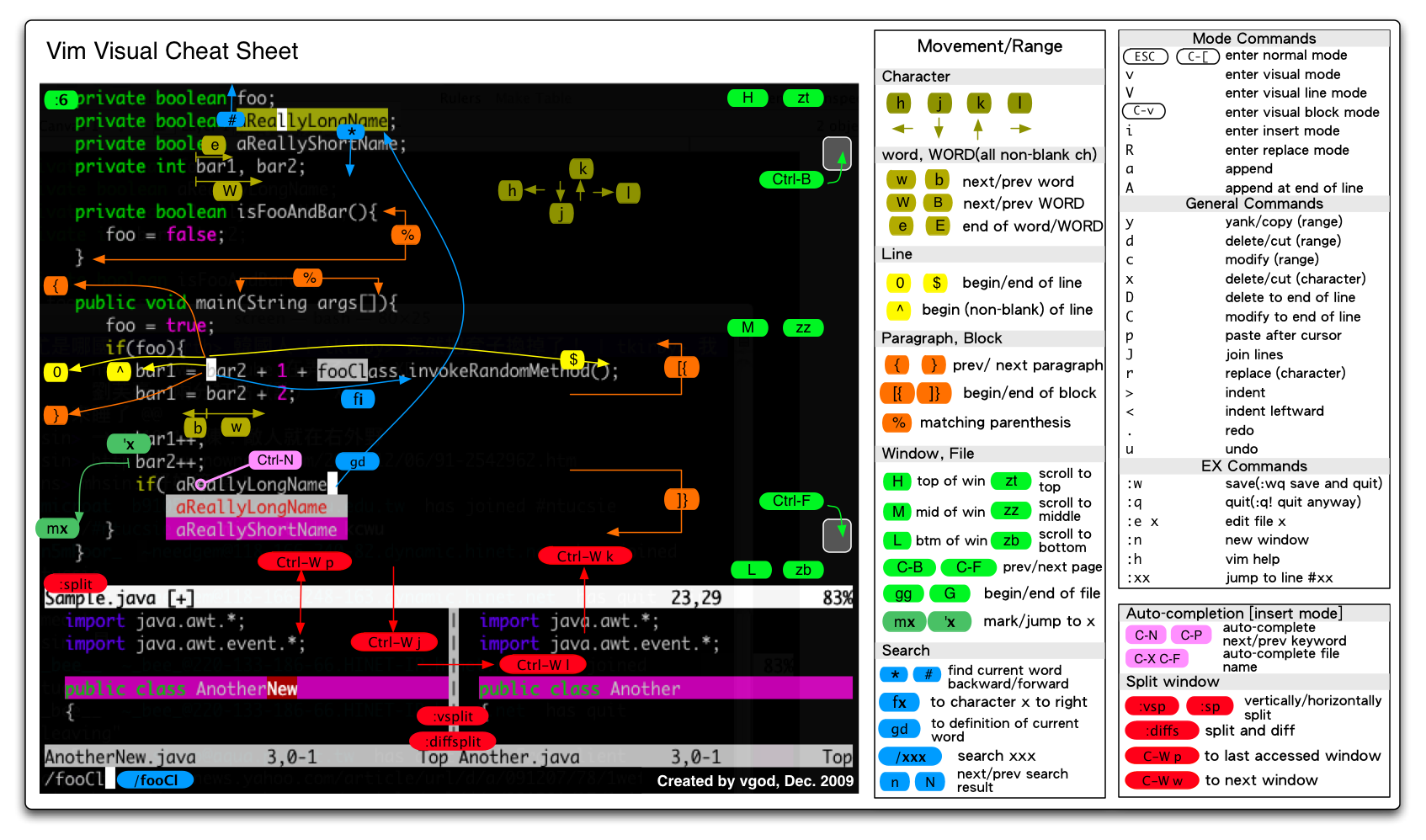
- http://people.csail.mit.edu/vgod/vim/vim-cheat-sheet-en.png
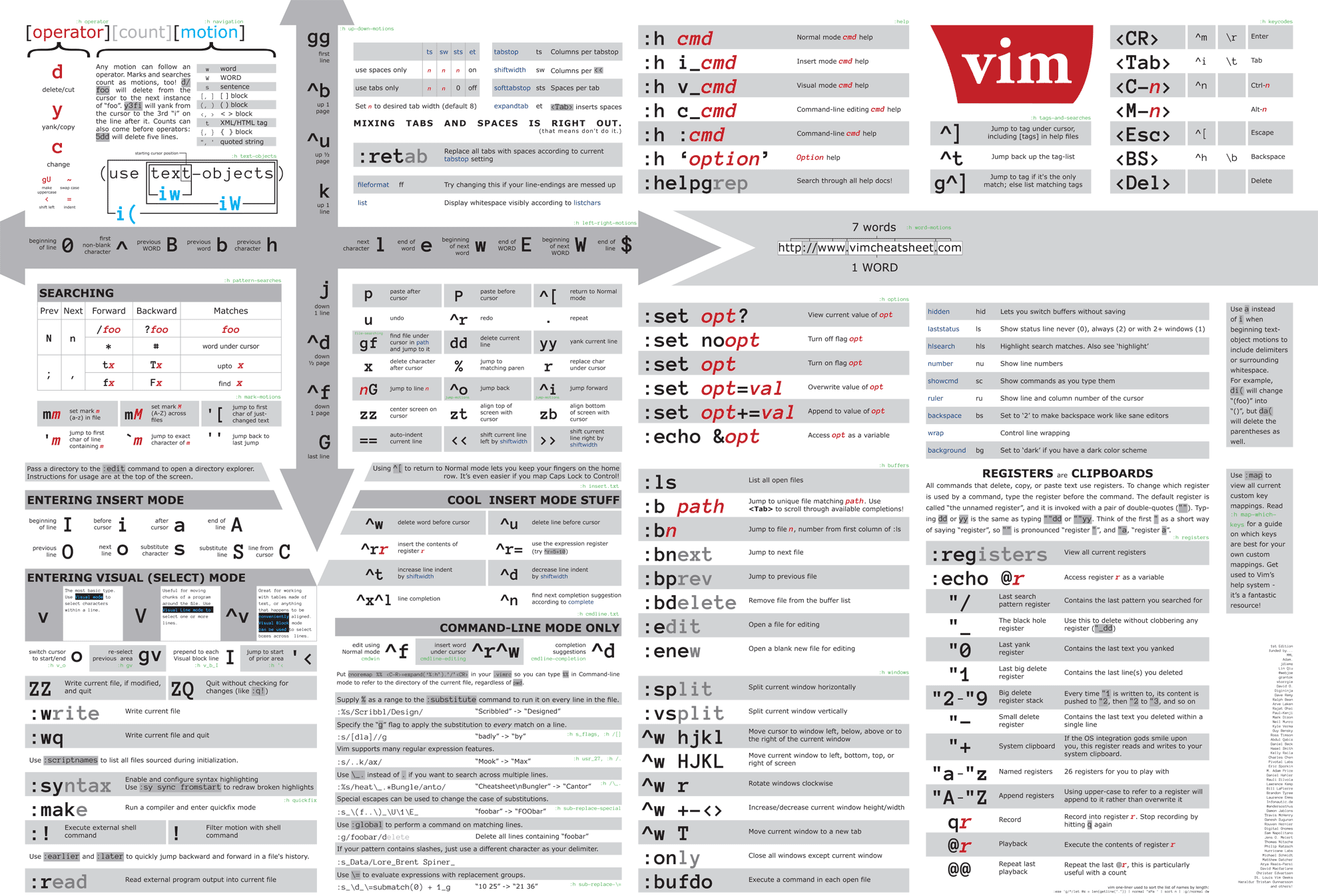
- https://cdn.shopify.com/s/files/1/0165/4168/files/preview.png
- http://www.nathael.org/Data/vi-vim-cheat-sheet.svg
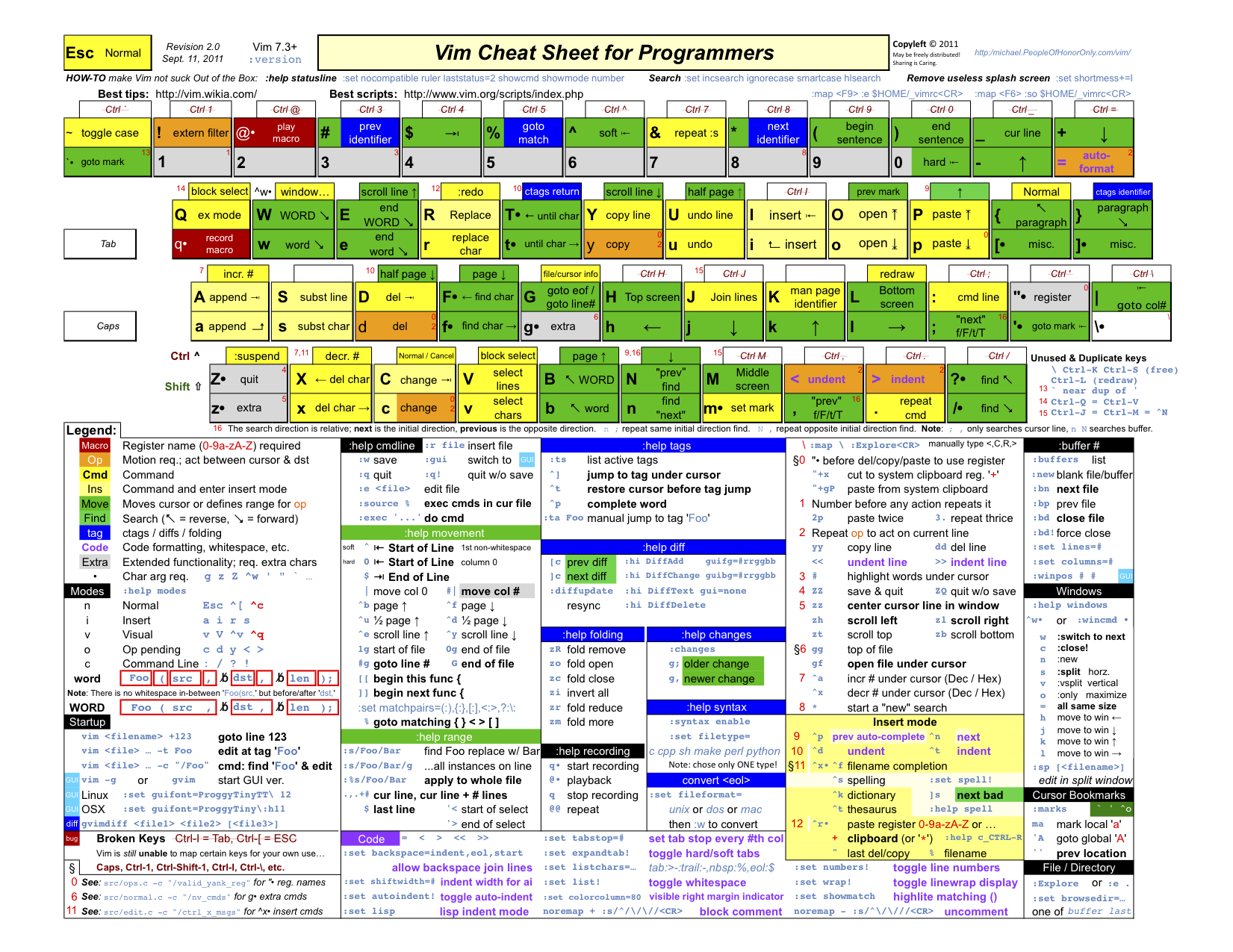
- http://michael.peopleofhonoronly.com/vim/vim_cheat_sheet_for_programmers_screen.png
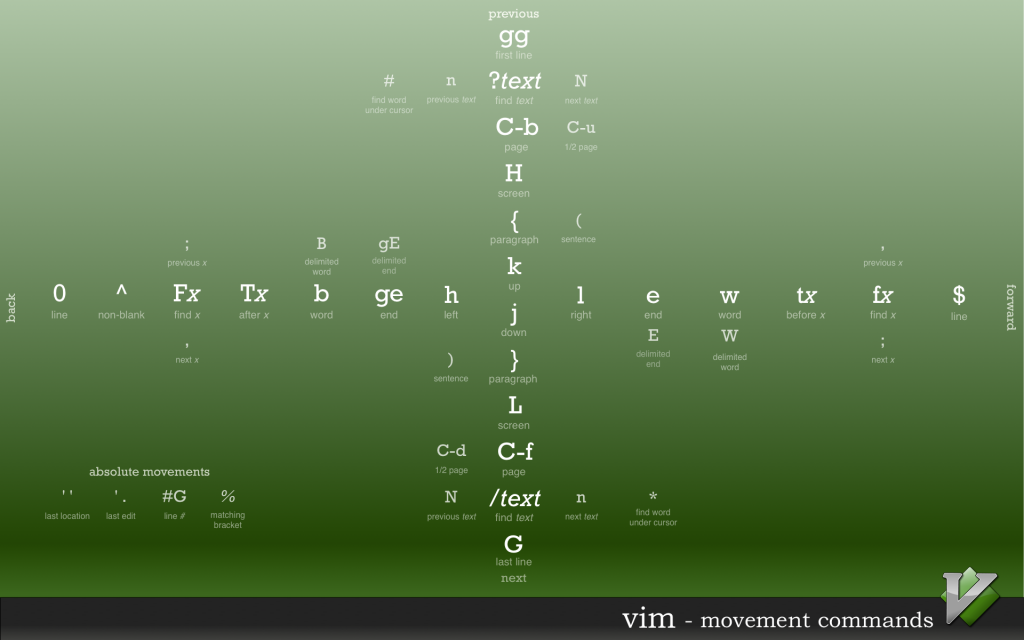
- http://www.rosipov.com/images/posts/vim-movement-commands-cheatsheet.png